4.10 Development Components
This section describes development components. The development component is available for use only for SCCDE Test Run.
4.10.1 Dummy Collector#
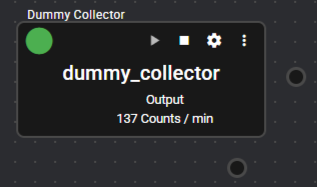
This is a component for registering dummy data.
Based on the detail of designated Operation file (csv), a column is created, and dummy data is registered.
4.10.1.1 Basic Information#
The basic information of the Dummy Collector is as follows.
| Item | Description |
|---|---|
| Base name | Dummy Collector |
| Description | Dummy data is registered. |
| Consumption point | 0 |
| Port | Input: 0 Output: 1 This outputs dummy data based on the contents of Operation file (csv). System: 1 This outputs component operation status and error information. For details about the error information to be output, refer to Error Code List. |
4.10.1.2 Setting item#
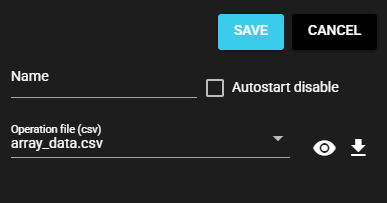
Dummy Collector setting items are as follows.
| Item | Description |
|---|---|
| Name | Enter a component name. Note: The same name as another component name cannot be used. |
| Autostart disable | Select ON to disable the Autostart of the component. |
| Operation file (csv) | Select the csv file that defines the columns to be created and the data to be registered. |
The operation file is located in the simulation_data directory which is found in the sccde work directory.
In the default setting, the following files are available for selection, but other files can also be added and selected.
For the format of the operation file, see "Operation file format".
| File name | Description |
|---|---|
| all_primitive_data_type.csv | This registers primitive type data. |
| array_data.csv | This registers array data. |
4.10.2 Dummy Emitter#
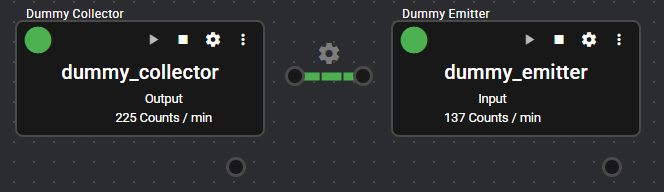
This component saves the collected data as a CSV file to storage.
This receives primitive type data from components connected to the IN Port and saves the data in a specified directory.
4.10.2.1 Basic Information#
The basic information of the Dummy Emitter is as follows.
| Item | Description |
|---|---|
| Base name | Dummy Emitter |
| Description | This saves the collected data in CSV format and stores it in the storage. |
| Consumption point | 0 |
| Port | Input: 1 This receives primitive type data from the component. The received data is saved in the storage in CSV format. Output: 0 System: 1 This outputs component operation status and error information. For details about the error information to be output, refer to Error Code List. |
4.10.2.2 Setting item#
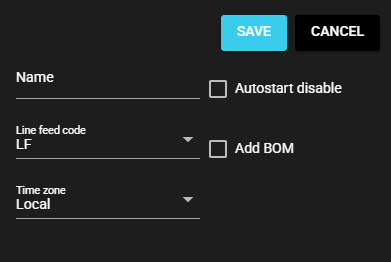
Dummy Emitter setting items are as follows.
| Item | Description |
|---|---|
| Name | Name to give the component Note: The same name as another component name cannot be used. |
| Autostart disable | Select ON to disable the Autostart of the component. |
| Line feed code | Select the line feed code for the CSV file. |
| Add BOM. | Select ON if File BOM is added to the CSV file. |
| Time zone | Select the time zone of the timestamp to be given to the file and CSV data |
The output goes to the .synapse/var-speedbeesynapse/projects/sccde/data directory which is found in the sccde work directory.
A directory is created for each registered Dummy Emitter, and a file is output.
4.10.2.3 Timing of file switching#
Each time Dummy Emitter is started, the file is switched to a new one. After startup, output continues to be generated in the same file as a rule, but the file is switched to a new one only in the following cases.
- When the file size exceeds the maximum limit (10 MB).
- When the column definition (number of columns, column names, etc.) of the data received at the IN port changes.
Note: The output files are not automatically deleted, so delete them as necessary.