5.1.1 Overview
5.1.1.1 Custom Component#
In SpeeDBee Synapse, a module that collects and transmits data is called a component.
The product comes standard equipped with components for collecting data from PLCs and other devices and components for sending data to the cloud. It is also possible for users to develop and operate their own components.
Although you can use C or Python to develop components, this chapter describes the basic concepts that are commonly needed to develop custom components regardless of language.
5.1.1.2 Component Bases and Component Instances#
Implementing a custom component requires understanding of the difference between a component base and a component instance while they are both generally referred to as "components."
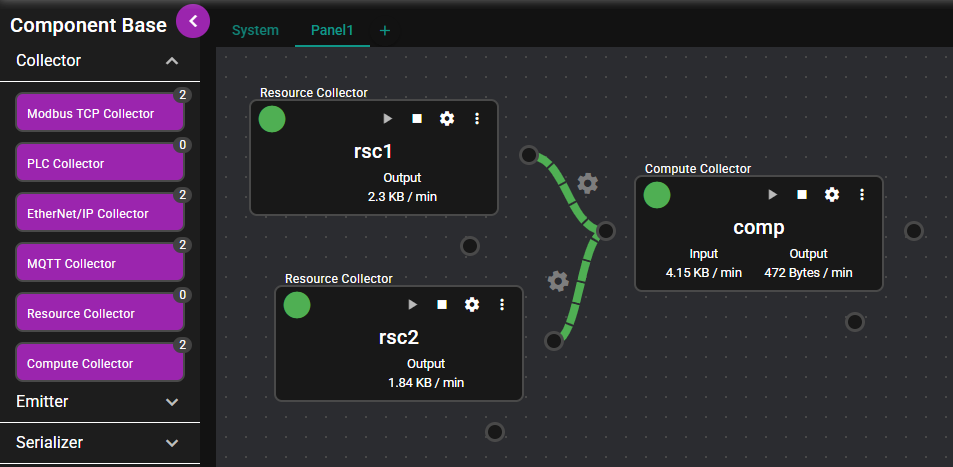
The items aligned in a column on the left side are the component bases. The three elements placed in the center and the right side are the component instances.
A component instance is created by dragging and dropping one of the component bases. Except for special cases, you can create multiple component instances from a single component base.
The same applies when implementing custom components. When you create a custom component, a new component base is added to the left column of the screen. You can create multiple component instances by dragging and dropping the added component base.
5.1.1.3 Lifecycle of Component Instance#
All component instances operate along the lifecycle shown below from the time they are created until they are deleted.
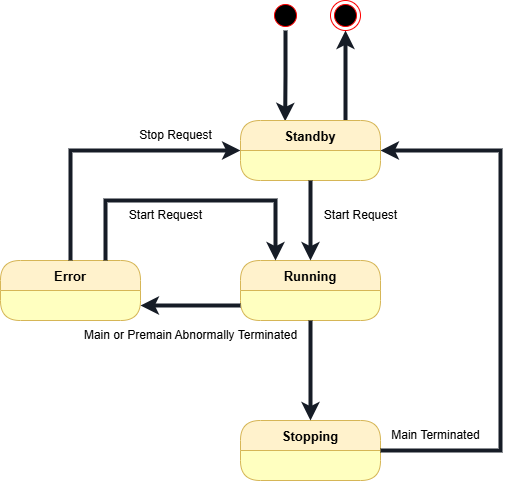
- Immediately after a component instance is created, it is in
Standbystate.
In this state, the component is not running at all. No data is output and no data is input. - Clicking the start icon of a component instance transitions it to the
Runningstate.
In this state, the component instance can continuously output data or receive data from other components. - When you click the stop icon of a component instance, it transitions to the
Stoppingstate, and then returns to theStandbystate once all operations are complete. - If an error or any other event that prevents continuation of the processing of the component instance occurs during the
Runningstate, the status changes toErrorand processing stops.
When developing custom components, you can program various operations in this lifecycle. The following chapters explain how to implement components by programming language.
5.1.1.4 Input and Output Ports of Components#
Each component has output and input ports. An output port is an element that outputs data generated by that component or collected through external access to the SpeeDBee Synapse. An input port is an element that accepts data output by another component and uses it for that component.
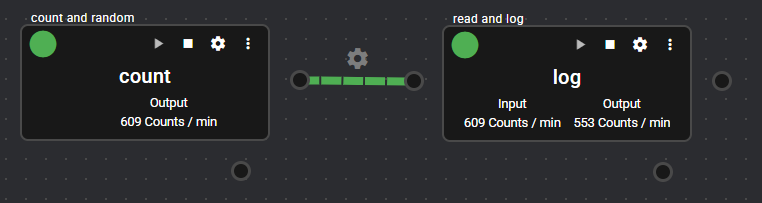
When implementing custom components, you must specify the number of ports for each component. For components that output data, set the number of output ports to 1. For components that accept data, set the number of input ports to 1. If a component does not need either or both of the ports, set the number of the relevant port(s) to 0. Future updates may enable components to handle multiple ports, but as of current version, each component is limited to having a maximum of one input port and one output port.