4.5 Deserializer
This section explains each deserializer component.
4.5.1 JSON Deserializer#
This component outputs specified JSON data.
It receives JSON from the input port and outputs the value specified by the JSONPath.

4.5.1.1 Basic Information#
The basic information on the JSON deserializer is as follows:
| Item | Description |
|---|---|
| Base name | JSON |
| Description | Receives JSON file from a component, processes it into data, and passes it to another component. |
| Consumption point | 0 |
| Port | Input:1 Receives JSON file from other components. Output:1 Outputs data created by processing input JSON file. System:1 This outputs component operation status and error information. For details about the error information to be output, refer to Error Code List. |
4.5.1.2 Configuration Items#
The JSON deserializer configuration items are as follows:
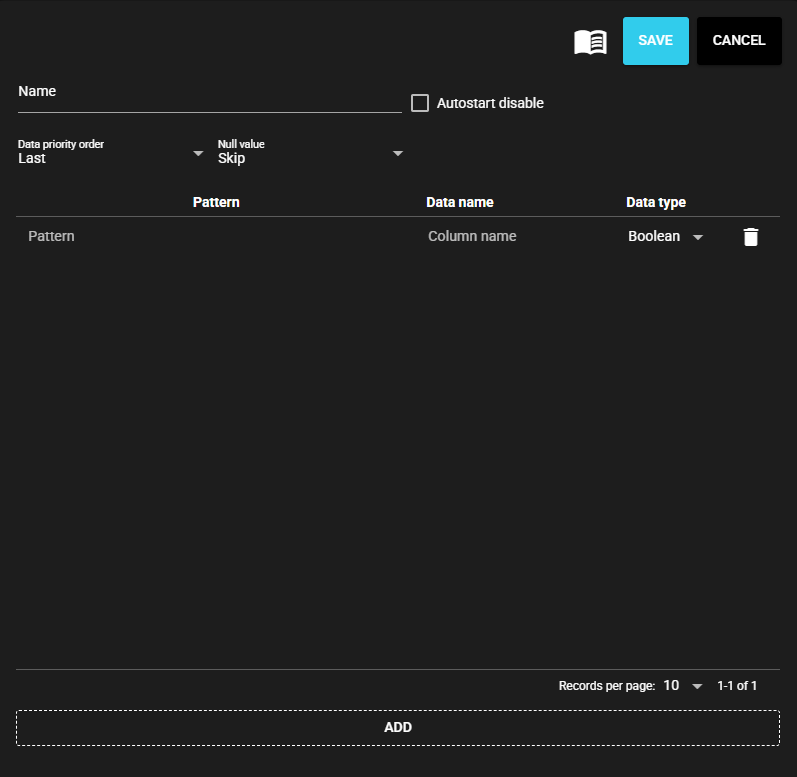
| Item | Description |
|---|---|
| Name | Name to be assigned to the component Note: The same name as another component name cannot be used. |
| Autostart disable | Select ON to disable the Autostart of the component. |
| NULL value | Select output when null is received Skip:Skip without registering value Default value:Treat as default value for each data type
Note: Strings are always skipped |
- The processing data for the JSON deserializer is defined by the following configuration items:
| Item | Description |
|---|---|
| Pattern | Enter the JSONPath. |
| Data name | Enter name of data. |
| Data type | Select the data type of the register value to be acquired. |
| Aggregation | Selects the output value when multiple matches are found for a pattern. Top:Output the first matched data Last:Output the last matched data Sum:Output the total value of the matched data Avg:Output the average of the matched data Max:Outputs the maximum of matched data Min:Outputs the minimum of the matched data Concat:Outputs the concatenation of all matched data (String only) |
Pattern input Examples
JSON
{
  "items": [
    { "id": 1, "value": 1 },
    { "id": 2, "value": 2 },
    { "id": 3, "value": 3 },
    {
      "id": 4,
      "sub_items": [
        { "id": 41, "value": 41 },
        { "id": 42, "value": 42 }
      ]
    }
  ]
}
| Pattern | Match result | Aggregation | Output |
|---|---|---|---|
| $..value | [1, 2, 3, 41, 42] | Last | 42 |
| $.items[1].value | 2 | Last | 2 |
| $..[?(@.id>=3)].value | [3, 41, 42] | Last | 42 |
| $["items"][*]["sub_items"]..value | [41, 42] | Top | 41 |
Data order
If a pattern matches multiple results, they are matched in lexicographical order.
JSON
{
  "b": {
    "a": "$['b']['a']"
  },
  "d": [
    {
      "a": "$['d'][0]['a']"
    },
    {
      "b": {
        "a": "$['d'][1]['b']['a']"
      }
    }
  ],
  "a": "$['a']",
  "c": [
    {
      "b": {
        "a": "$['c'][0]['b']['a']"
      },
      "a": "$['c'][0]['a']"
    },
    {
      "a": "$['c'][1]['a']",
      "b": {
        "a": "$['c'][1]['b']['a']"
      }
    }
  ]
}
Pattern: $..a
Match order
- $['a']
- $['b']['a']
- $['c'][0]['a']
- $['c'][0]['b']['a']
- $['c'][1]['a']
- $['c'][1]['b']['a']
- $['d'][0]['a']
- $['d'][1]['b']['a']
If the aggregation is "Last", $['d'][1]['b']['a'] will be registered, and if it is "Top", $['a'] will be registered.